📘 DAY 10: HTML COMMENTS
1️⃣ What are HTML Comments?
HTML comments are used to:
-
Add notes inside HTML code
-
Explain code for developers
-
Temporarily disable code
👉 Comments are not displayed in the browser.
2️⃣ HTML Comment Syntax
HTML comments are written using:
Anything inside <!-- --> is ignored by the browser.
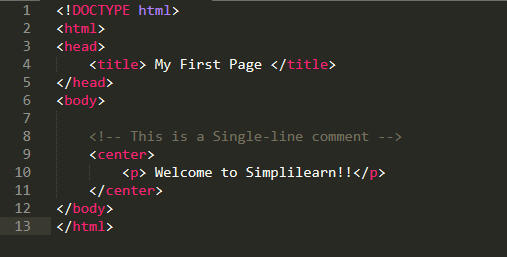
3️⃣ Simple Example
Output in browser:
👉 Comments are invisible to users.
4️⃣ Multi-line Comments
HTML supports multi-line comments.
5️⃣ Commenting Out HTML Code
Comments are often used to disable code temporarily.
👉 The paragraph will not appear in the browser.
6️⃣ Why Use HTML Comments?
HTML comments are useful for:
✔ Understanding code
✔ Debugging
✔ Team collaboration
✔ Organizing large HTML files
7️⃣ Comments for Section Marking
👉 Makes code clean & readable
8️⃣ HTML Comments and Security
⚠️ Comments are visible in page source
(Right click → View Page Source)
❌ Do NOT write:
-
Passwords
-
API keys
-
Confidential information
9️⃣ Invalid HTML Comment (Wrong)
❌ This will cause issues:
❌ Nested comments:
🔟 Correct HTML Comment Rules
✔ Start with <!--
✔ End with -->
✔ No nested comments
✔ No sensitive data
1️⃣1️⃣ Common Beginner Mistakes
❌ Forgetting closing -->
❌ Writing comments inside tags
❌ Expecting comments to show output
❌ Using comments for styling
1️⃣2️⃣ Comments vs Text
| Comment | Text |
|---|---|
| Not visible | Visible |
| For developers | For users |
| Ignored by browser | Rendered |
1️⃣3️⃣ Practice Example
1️⃣4️⃣ Interview / Viva Questions
-
What are HTML comments?
-
What is the syntax of HTML comments?
-
Are comments visible to users?
-
Can we write multi-line comments?
-
Why should we avoid sensitive data in comments?
1️⃣5️⃣ Summary
-
HTML comments explain code
-
Not displayed in browser
-
Used for debugging & readability
-
Follow proper syntax
-
Avoid sensitive data
0 comments:
Post a Comment