SEARCH HERE

Latest Updates

Tuesday, February 3, 2026

📘 DAY 12: HTML CSS


📘 DAY 12: HTML CSS 


1️⃣ What is CSS?

CSS stands for Cascading Style Sheets.

CSS is used to:

  • Style HTML elements

  • Control layout and design

  • Improve user experience

👉 HTML = structure
👉 CSS = design


2️⃣ Why Do We Need CSS?

Without CSS:

  • Pages look plain

  • No colors or layout

  • Poor readability

With CSS:
✔ Attractive design
✔ Consistent styling
✔ Easy maintenance


3️⃣ Ways to Apply CSS in HTML

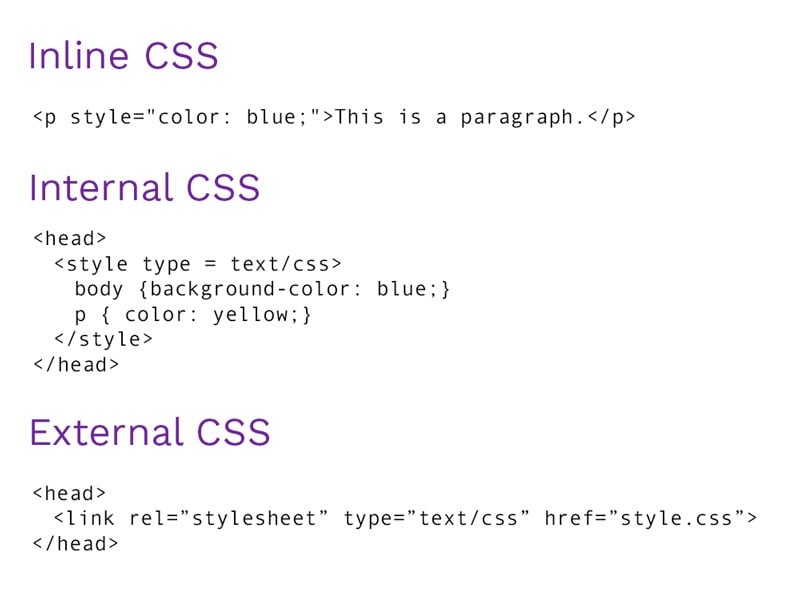
There are three ways to apply CSS:

  1. Inline CSS

  2. Internal CSS

  3. External CSS


4️⃣ Inline CSS

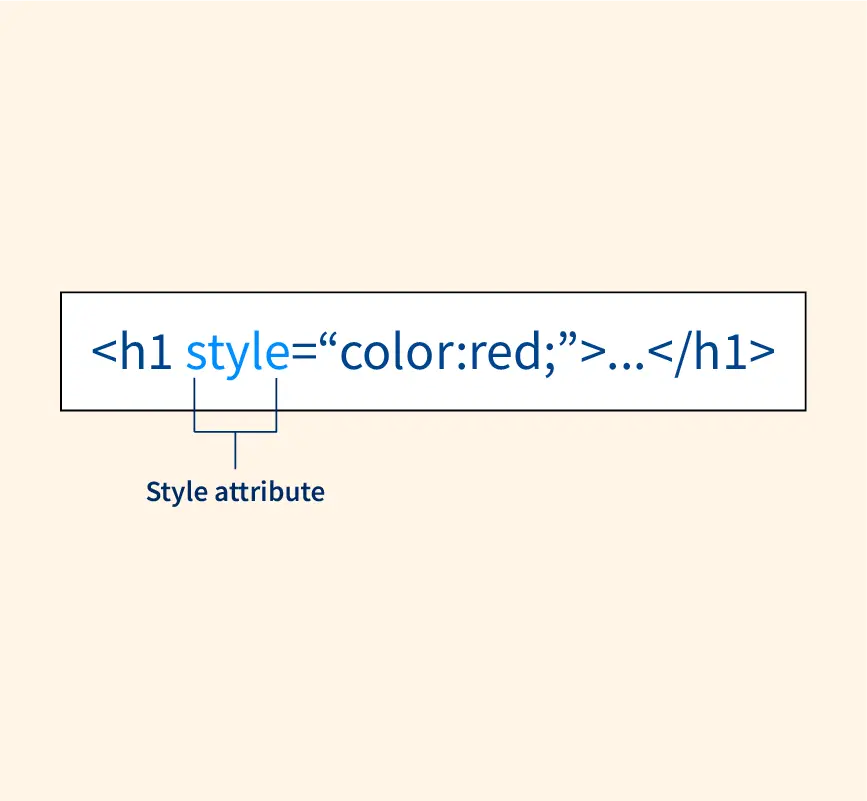
Inline CSS is written inside the HTML element using the style attribute.

Syntax:

<tag style="property:value;">

Example:

<p style="color:red; font-size:18px;"> Inline CSS Example </p>

✔ Advantages

  • Quick styling

  • Easy for beginners

❌ Disadvantages

  • Not reusable

  • Messy code

  • Not recommended for large pages


5️⃣ Internal CSS

Internal CSS is written inside the <style> tag in the <head> section.

Syntax:

<head> <style> p { color: blue; font-size: 18px; } </style> </head>

Example:

<!DOCTYPE html> <html> <head> <style> h1 { color: green; text-align: center; } p { color: blue; } </style> </head> <body> <h1>Internal CSS</h1> <p>This is styled using internal CSS.</p> </body> </html>

✔ Advantages

  • Better than inline

  • Styles multiple elements

❌ Disadvantages

  • Not reusable across pages


6️⃣ External CSS

External CSS is written in a separate .css file and linked to HTML.

Step 1: Create CSS file (style.css)

h1 { color: purple; text-align: center; } p { font-size: 18px; color: gray; }

Step 2: Link CSS file in HTML

<head> <link rel="stylesheet" href="style.css"> </head>

✔ Advantages

✔ Reusable
✔ Clean HTML
✔ Best practice
✔ Used in real projects

❌ Disadvantages

  • Slightly complex for beginners


7️⃣ CSS Selectors (Basic)

Selectors choose which HTML elements to style.

Element Selector

p { color: blue; }

Class Selector

.text { color: red; }

HTML:

<p class="text">Hello</p>

ID Selector

#main { font-size: 24px; }

HTML:

<h1 id="main">Title</h1>

8️⃣ Priority Order of CSS (Very Important)

If multiple CSS types are applied:

1️⃣ Inline CSS (Highest priority)
2️⃣ Internal CSS
3️⃣ External CSS (Lowest priority)


9️⃣ Comparison Table

FeatureInlineInternalExternal
LocationInside tagInside <head>Separate file
Reusable
Best practice⚠️
Used in real projects

🔟 Common Beginner Mistakes

❌ Forgetting to link CSS file
❌ Wrong file path
❌ Mixing inline everywhere
❌ Using same id multiple times


1️⃣1️⃣ Practice Example

✔ Create index.html
✔ Create style.css
✔ Apply styles to heading and paragraph


1️⃣2️⃣ Interview / Viva Questions

  1. What is CSS?

  2. Types of CSS?

  3. Difference between inline and external CSS?

  4. Which CSS has highest priority?

  5. Why is external CSS recommended?


1️⃣3️⃣ Summary

  • CSS styles HTML pages

  • Three types: inline, internal, external

  • External CSS is best practice

  • CSS selectors target elements

  • Proper CSS improves design & maintenance
 

📘 DAY 12: HTML CSS 


1️⃣ What is CSS?

CSS stands for Cascading Style Sheets.

CSS is used to:

  • Style HTML elements

  • Control layout and design

  • Improve user experience

👉 HTML = structure
👉 CSS = design


2️⃣ Why Do We Need CSS?

Without CSS:

  • Pages look plain

  • No colors or layout

  • Poor readability

With CSS:
✔ Attractive design
✔ Consistent styling
✔ Easy maintenance


3️⃣ Ways to Apply CSS in HTML

There are three ways to apply CSS:

  1. Inline CSS

  2. Internal CSS

  3. External CSS


4️⃣ Inline CSS

Inline CSS is written inside the HTML element using the style attribute.

Syntax:

<tag style="property:value;">

Example:

<p style="color:red; font-size:18px;"> Inline CSS Example </p>

✔ Advantages

  • Quick styling

  • Easy for beginners

❌ Disadvantages

  • Not reusable

  • Messy code

  • Not recommended for large pages


5️⃣ Internal CSS

Internal CSS is written inside the <style> tag in the <head> section.

Syntax:

<head> <style> p { color: blue; font-size: 18px; } </style> </head>

Example:

<!DOCTYPE html> <html> <head> <style> h1 { color: green; text-align: center; } p { color: blue; } </style> </head> <body> <h1>Internal CSS</h1> <p>This is styled using internal CSS.</p> </body> </html>

✔ Advantages

  • Better than inline

  • Styles multiple elements

❌ Disadvantages

  • Not reusable across pages


6️⃣ External CSS

External CSS is written in a separate .css file and linked to HTML.

Step 1: Create CSS file (style.css)

h1 { color: purple; text-align: center; } p { font-size: 18px; color: gray; }

Step 2: Link CSS file in HTML

<head> <link rel="stylesheet" href="style.css"> </head>

✔ Advantages

✔ Reusable
✔ Clean HTML
✔ Best practice
✔ Used in real projects

❌ Disadvantages

  • Slightly complex for beginners


7️⃣ CSS Selectors (Basic)

Selectors choose which HTML elements to style.

Element Selector

p { color: blue; }

Class Selector

.text { color: red; }

HTML:

<p class="text">Hello</p>

ID Selector

#main { font-size: 24px; }

HTML:

<h1 id="main">Title</h1>

8️⃣ Priority Order of CSS (Very Important)

If multiple CSS types are applied:

1️⃣ Inline CSS (Highest priority)
2️⃣ Internal CSS
3️⃣ External CSS (Lowest priority)


9️⃣ Comparison Table

FeatureInlineInternalExternal
LocationInside tagInside <head>Separate file
Reusable
Best practice⚠️
Used in real projects

🔟 Common Beginner Mistakes

❌ Forgetting to link CSS file
❌ Wrong file path
❌ Mixing inline everywhere
❌ Using same id multiple times


1️⃣1️⃣ Practice Example

✔ Create index.html
✔ Create style.css
✔ Apply styles to heading and paragraph


1️⃣2️⃣ Interview / Viva Questions

  1. What is CSS?

  2. Types of CSS?

  3. Difference between inline and external CSS?

  4. Which CSS has highest priority?

  5. Why is external CSS recommended?


1️⃣3️⃣ Summary

  • CSS styles HTML pages

  • Three types: inline, internal, external

  • External CSS is best practice

  • CSS selectors target elements

  • Proper CSS improves design & maintenance

📘 DAY 11: HTML COLORS


📘 DAY 11: HTML COLORS 

1️⃣ What are HTML Colors?

HTML Colors are used to:

  • Set text color

  • Set background color

  • Style borders and elements

Colors are applied using CSS properties, mostly through the style attribute in HTML.


2️⃣ Applying Color in HTML

Colors are usually applied using:

style="color:value;"

Example:

<p style="color:red;">This is red text</p>

3️⃣ Types of Color Values in HTML

HTML supports four main types of color values:

  1. Color Names

  2. HEX Values

  3. RGB Values

  4. RGBA Values


4️⃣ HTML Color Names

HTML supports predefined color names.

Examples:

<p style="color:blue;">Blue Text</p> <p style="color:green;">Green Text</p> <p style="color:orange;">Orange Text</p>

👉 Easy to use, but limited choices


5️⃣ HEX Color Values

HEX values represent colors using hexadecimal numbers.

Format:

#RRGGBB

Example:

<p style="color:#ff0000;">Red Text</p> <p style="color:#00ff00;">Green Text</p> <p style="color:#0000ff;">Blue Text</p>

✔ Most commonly used
✔ More control over colors


6️⃣ RGB Color Values

RGB stands for Red, Green, Blue.

Format:

rgb(red, green, blue)

Example:

<p style="color:rgb(255,0,0);">Red</p> <p style="color:rgb(0,255,0);">Green</p> <p style="color:rgb(0,0,255);">Blue</p>

👉 Values range from 0 to 255


7️⃣ RGBA Color Values

RGBA is RGB with Alpha (opacity).

Format:

rgba(red, green, blue, alpha)

Example:

<p style="color:rgba(255,0,0,0.5);"> Semi-transparent Red </p>

✔ Alpha value ranges from 0 to 1


8️⃣ Background Colors

Background color is applied using:

background-color

Example:

<p style="background-color:yellow;"> Yellow Background </p>

9️⃣ Text and Background Together

<p style="color:white; background-color:black;"> White text on black background </p>

🔟 Border Colors

<p style="border:2px solid red;"> Red Border </p>

1️⃣1️⃣ Common Color Codes (Useful)

ColorHEX
Black#000000
White#ffffff
Red#ff0000
Green#00ff00
Blue#0000ff
Gray#808080

1️⃣2️⃣ Color Accessibility (Important)

✔ Use high contrast colors
✔ Avoid light text on light background
✔ Improves readability and accessibility


1️⃣3️⃣ Common Beginner Mistakes

❌ Forgetting # in HEX
❌ Using invalid color names
❌ Poor contrast combinations
❌ Overusing colors


1️⃣4️⃣ Practice Examples

Example 1:

<h1 style="color:#4CAF50;">HTML Colors</h1>

Example 2:

<p style="background-color:rgb(230,230,230);"> Light gray background </p>

1️⃣5️⃣ Interview / Viva Questions

  1. What are HTML colors?

  2. Types of color values in HTML?

  3. Difference between RGB and RGBA?

  4. What is HEX color code?

  5. What is alpha value?


1️⃣6️⃣ Summary

  • Colors style HTML elements

  • Use color and background-color

  • HEX and RGB are most common

  • RGBA supports transparency

  • Use colors carefully for readability


📘 DAY 11: HTML COLORS 

1️⃣ What are HTML Colors?

HTML Colors are used to:

  • Set text color

  • Set background color

  • Style borders and elements

Colors are applied using CSS properties, mostly through the style attribute in HTML.


2️⃣ Applying Color in HTML

Colors are usually applied using:

style="color:value;"

Example:

<p style="color:red;">This is red text</p>

3️⃣ Types of Color Values in HTML

HTML supports four main types of color values:

  1. Color Names

  2. HEX Values

  3. RGB Values

  4. RGBA Values


4️⃣ HTML Color Names

HTML supports predefined color names.

Examples:

<p style="color:blue;">Blue Text</p> <p style="color:green;">Green Text</p> <p style="color:orange;">Orange Text</p>

👉 Easy to use, but limited choices


5️⃣ HEX Color Values

HEX values represent colors using hexadecimal numbers.

Format:

#RRGGBB

Example:

<p style="color:#ff0000;">Red Text</p> <p style="color:#00ff00;">Green Text</p> <p style="color:#0000ff;">Blue Text</p>

✔ Most commonly used
✔ More control over colors


6️⃣ RGB Color Values

RGB stands for Red, Green, Blue.

Format:

rgb(red, green, blue)

Example:

<p style="color:rgb(255,0,0);">Red</p> <p style="color:rgb(0,255,0);">Green</p> <p style="color:rgb(0,0,255);">Blue</p>

👉 Values range from 0 to 255


7️⃣ RGBA Color Values

RGBA is RGB with Alpha (opacity).

Format:

rgba(red, green, blue, alpha)

Example:

<p style="color:rgba(255,0,0,0.5);"> Semi-transparent Red </p>

✔ Alpha value ranges from 0 to 1


8️⃣ Background Colors

Background color is applied using:

background-color

Example:

<p style="background-color:yellow;"> Yellow Background </p>

9️⃣ Text and Background Together

<p style="color:white; background-color:black;"> White text on black background </p>

🔟 Border Colors

<p style="border:2px solid red;"> Red Border </p>

1️⃣1️⃣ Common Color Codes (Useful)

ColorHEX
Black#000000
White#ffffff
Red#ff0000
Green#00ff00
Blue#0000ff
Gray#808080

1️⃣2️⃣ Color Accessibility (Important)

✔ Use high contrast colors
✔ Avoid light text on light background
✔ Improves readability and accessibility


1️⃣3️⃣ Common Beginner Mistakes

❌ Forgetting # in HEX
❌ Using invalid color names
❌ Poor contrast combinations
❌ Overusing colors


1️⃣4️⃣ Practice Examples

Example 1:

<h1 style="color:#4CAF50;">HTML Colors</h1>

Example 2:

<p style="background-color:rgb(230,230,230);"> Light gray background </p>

1️⃣5️⃣ Interview / Viva Questions

  1. What are HTML colors?

  2. Types of color values in HTML?

  3. Difference between RGB and RGBA?

  4. What is HEX color code?

  5. What is alpha value?


1️⃣6️⃣ Summary

  • Colors style HTML elements

  • Use color and background-color

  • HEX and RGB are most common

  • RGBA supports transparency

  • Use colors carefully for readability

📘 DAY 10: HTML COMMENTS

📘 DAY 10: HTML COMMENTS 


1️⃣ What are HTML Comments?

HTML comments are used to:

  • Add notes inside HTML code

  • Explain code for developers

  • Temporarily disable code

👉 Comments are not displayed in the browser.


2️⃣ HTML Comment Syntax

HTML comments are written using:

<!-- This is a comment -->

Anything inside <!-- --> is ignored by the browser.


3️⃣ Simple Example

<!-- This is a heading --> <h1>Welcome</h1> <!-- This is a paragraph --> <p>Hello HTML</p>

Output in browser:

Welcome Hello HTML

👉 Comments are invisible to users.


4️⃣ Multi-line Comments

HTML supports multi-line comments.

<!-- This is a multi-line comment. Used to explain large code blocks. -->

5️⃣ Commenting Out HTML Code

Comments are often used to disable code temporarily.

<!-- <p>This paragraph is hidden</p> -->

👉 The paragraph will not appear in the browser.


6️⃣ Why Use HTML Comments?

HTML comments are useful for:
✔ Understanding code
✔ Debugging
✔ Team collaboration
✔ Organizing large HTML files


7️⃣ Comments for Section Marking

<!-- Header Section --> <header> <h1>My Website</h1> </header> <!-- Main Content --> <main> <p>Content here</p> </main>

👉 Makes code clean & readable


8️⃣ HTML Comments and Security

⚠️ Comments are visible in page source
(Right click → View Page Source)

❌ Do NOT write:

  • Passwords

  • API keys

  • Confidential information


9️⃣ Invalid HTML Comment (Wrong)

❌ This will cause issues:

<!---- This is wrong --->

❌ Nested comments:

<!-- Comment <!-- nested --> -->

🔟 Correct HTML Comment Rules

✔ Start with <!--
✔ End with -->
✔ No nested comments
✔ No sensitive data


1️⃣1️⃣ Common Beginner Mistakes

❌ Forgetting closing -->
❌ Writing comments inside tags
❌ Expecting comments to show output
❌ Using comments for styling


1️⃣2️⃣ Comments vs Text

CommentText
Not visibleVisible
For developersFor users
Ignored by browserRendered

1️⃣3️⃣ Practice Example

<!-- Page Title --> <h1>HTML Comments</h1> <!-- Description --> <p>This page explains comments.</p>

1️⃣4️⃣ Interview / Viva Questions

  1. What are HTML comments?

  2. What is the syntax of HTML comments?

  3. Are comments visible to users?

  4. Can we write multi-line comments?

  5. Why should we avoid sensitive data in comments?


1️⃣5️⃣ Summary

  • HTML comments explain code

  • Not displayed in browser

  • Used for debugging & readability

  • Follow proper syntax

  • Avoid sensitive data


https://www.simplilearn.com/ice9/free_resources_article_thumb/single_line_comment-html_comments.PNG

📘 DAY 10: HTML COMMENTS 


1️⃣ What are HTML Comments?

HTML comments are used to:

  • Add notes inside HTML code

  • Explain code for developers

  • Temporarily disable code

👉 Comments are not displayed in the browser.


2️⃣ HTML Comment Syntax

HTML comments are written using:

<!-- This is a comment -->

Anything inside <!-- --> is ignored by the browser.


3️⃣ Simple Example

<!-- This is a heading --> <h1>Welcome</h1> <!-- This is a paragraph --> <p>Hello HTML</p>

Output in browser:

Welcome Hello HTML

👉 Comments are invisible to users.


4️⃣ Multi-line Comments

HTML supports multi-line comments.

<!-- This is a multi-line comment. Used to explain large code blocks. -->

5️⃣ Commenting Out HTML Code

Comments are often used to disable code temporarily.

<!-- <p>This paragraph is hidden</p> -->

👉 The paragraph will not appear in the browser.


6️⃣ Why Use HTML Comments?

HTML comments are useful for:
✔ Understanding code
✔ Debugging
✔ Team collaboration
✔ Organizing large HTML files


7️⃣ Comments for Section Marking

<!-- Header Section --> <header> <h1>My Website</h1> </header> <!-- Main Content --> <main> <p>Content here</p> </main>

👉 Makes code clean & readable


8️⃣ HTML Comments and Security

⚠️ Comments are visible in page source
(Right click → View Page Source)

❌ Do NOT write:

  • Passwords

  • API keys

  • Confidential information


9️⃣ Invalid HTML Comment (Wrong)

❌ This will cause issues:

<!---- This is wrong --->

❌ Nested comments:

<!-- Comment <!-- nested --> -->

🔟 Correct HTML Comment Rules

✔ Start with <!--
✔ End with -->
✔ No nested comments
✔ No sensitive data


1️⃣1️⃣ Common Beginner Mistakes

❌ Forgetting closing -->
❌ Writing comments inside tags
❌ Expecting comments to show output
❌ Using comments for styling


1️⃣2️⃣ Comments vs Text

CommentText
Not visibleVisible
For developersFor users
Ignored by browserRendered

1️⃣3️⃣ Practice Example

<!-- Page Title --> <h1>HTML Comments</h1> <!-- Description --> <p>This page explains comments.</p>

1️⃣4️⃣ Interview / Viva Questions

  1. What are HTML comments?

  2. What is the syntax of HTML comments?

  3. Are comments visible to users?

  4. Can we write multi-line comments?

  5. Why should we avoid sensitive data in comments?


1️⃣5️⃣ Summary

  • HTML comments explain code

  • Not displayed in browser

  • Used for debugging & readability

  • Follow proper syntax

  • Avoid sensitive data


https://www.simplilearn.com/ice9/free_resources_article_thumb/single_line_comment-html_comments.PNG

📘 DAY 9: HTML FORMATTING TAGS


📘 DAY 9: HTML FORMATTING TAGS 


1️⃣ What are HTML Formatting Tags?

HTML Formatting Tags are used to:

  • Format text

  • Highlight important content

  • Improve readability

  • Add meaning (semantic value)

They change how text looks and sometimes what it means.


2️⃣ Basic Formatting Tags Overview

TagPurpose
<b>Bold text
<i>Italic text
<u>Underline text
<strong>Important text
<em>Emphasized text
<mark>Highlight text
<small>Smaller text
<del>Deleted text
<ins>Inserted text
<sub>Subscript
<sup>Superscript

3️⃣ <b> – Bold Text

Displays text in bold, but has no semantic importance.

<p>This is <b>bold</b> text</p>

👉 Use only for visual styling.


4️⃣ <strong> – Important Text

Displays text in bold, but also indicates importance.

<p>This is <strong>important</strong> text</p>

✔ Better for SEO & accessibility


5️⃣ <i> – Italic Text

Displays text in italic, no extra meaning.

<p>This is <i>italic</i> text</p>

6️⃣ <em> – Emphasized Text

Displays text in italic with emphasis meaning.

<p>This is <em>emphasized</em> text</p>

✔ Screen readers stress this text
✔ Preferred over <i>


7️⃣ <u> – Underline Text

Underlines the text.

<p>This is <u>underlined</u> text</p>

⚠️ Avoid excessive use (can look like links).


8️⃣ <mark> – Highlight Text

Highlights text with background color.

<p>This is <mark>highlighted</mark> text</p>

✔ Useful for notes & keywords


9️⃣ <small> – Smaller Text

Displays text in smaller font size.

<p>This is <small>small</small> text</p>

🔟 <del> – Deleted Text

Shows deleted content with strike-through.

<p>Price: <del>₹1000</del> ₹800</p>

1️⃣1️⃣ <ins> – Inserted Text

Shows inserted content (usually underlined).

<p><ins>New content added</ins></p>

1️⃣2️⃣ <sub> – Subscript Text

Used for chemical formulas.

<p>H<sub>2</sub>O</p>

1️⃣3️⃣ <sup> – Superscript Text

Used for math expressions.

<p>a<sup>2</sup> + b<sup>2</sup></p>

1️⃣4️⃣ Difference: <b> vs <strong>

<b><strong>
Visual onlySemantic meaning
No importanceImportant content
Not SEO-friendlySEO-friendly

1️⃣5️⃣ Difference: <i> vs <em>

<i><em>
Visual onlyEmphasis
No meaningSemantic
Avoid for contentRecommended

1️⃣6️⃣ Combining Formatting Tags

<p> This is <strong><em>very important</em></strong> text </p>

👉 Tags can be nested properly


1️⃣7️⃣ Common Beginner Mistakes

❌ Overusing <b> and <i>
❌ Ignoring semantic tags
❌ Incorrect nesting
❌ Using formatting instead of CSS


1️⃣8️⃣ Practice Examples

Example 1:

<p> <mark>HTML</mark> is <strong>easy</strong> to learn. </p>

Example 2:

<p> Formula: a<sup>2</sup> + b<sup>2</sup> </p>

1️⃣9️⃣ Interview / Viva Questions

  1. Difference between <b> and <strong>?

  2. Difference between <i> and <em>?

  3. What is <mark> tag?

  4. Where is <sub> used?

  5. Are formatting tags semantic?


2️⃣0️⃣ Summary

  • Formatting tags change text appearance

  • Semantic tags give meaning

  • Prefer <strong> & <em>

  • Avoid misuse of formatting

  • Use CSS for styling in real projects

https://www.homeandlearn.co.uk/WD/images/chapter1/notepad_B_I_tags.gif


📘 DAY 9: HTML FORMATTING TAGS 


1️⃣ What are HTML Formatting Tags?

HTML Formatting Tags are used to:

  • Format text

  • Highlight important content

  • Improve readability

  • Add meaning (semantic value)

They change how text looks and sometimes what it means.


2️⃣ Basic Formatting Tags Overview

TagPurpose
<b>Bold text
<i>Italic text
<u>Underline text
<strong>Important text
<em>Emphasized text
<mark>Highlight text
<small>Smaller text
<del>Deleted text
<ins>Inserted text
<sub>Subscript
<sup>Superscript

3️⃣ <b> – Bold Text

Displays text in bold, but has no semantic importance.

<p>This is <b>bold</b> text</p>

👉 Use only for visual styling.


4️⃣ <strong> – Important Text

Displays text in bold, but also indicates importance.

<p>This is <strong>important</strong> text</p>

✔ Better for SEO & accessibility


5️⃣ <i> – Italic Text

Displays text in italic, no extra meaning.

<p>This is <i>italic</i> text</p>

6️⃣ <em> – Emphasized Text

Displays text in italic with emphasis meaning.

<p>This is <em>emphasized</em> text</p>

✔ Screen readers stress this text
✔ Preferred over <i>


7️⃣ <u> – Underline Text

Underlines the text.

<p>This is <u>underlined</u> text</p>

⚠️ Avoid excessive use (can look like links).


8️⃣ <mark> – Highlight Text

Highlights text with background color.

<p>This is <mark>highlighted</mark> text</p>

✔ Useful for notes & keywords


9️⃣ <small> – Smaller Text

Displays text in smaller font size.

<p>This is <small>small</small> text</p>

🔟 <del> – Deleted Text

Shows deleted content with strike-through.

<p>Price: <del>₹1000</del> ₹800</p>

1️⃣1️⃣ <ins> – Inserted Text

Shows inserted content (usually underlined).

<p><ins>New content added</ins></p>

1️⃣2️⃣ <sub> – Subscript Text

Used for chemical formulas.

<p>H<sub>2</sub>O</p>

1️⃣3️⃣ <sup> – Superscript Text

Used for math expressions.

<p>a<sup>2</sup> + b<sup>2</sup></p>

1️⃣4️⃣ Difference: <b> vs <strong>

<b><strong>
Visual onlySemantic meaning
No importanceImportant content
Not SEO-friendlySEO-friendly

1️⃣5️⃣ Difference: <i> vs <em>

<i><em>
Visual onlyEmphasis
No meaningSemantic
Avoid for contentRecommended

1️⃣6️⃣ Combining Formatting Tags

<p> This is <strong><em>very important</em></strong> text </p>

👉 Tags can be nested properly


1️⃣7️⃣ Common Beginner Mistakes

❌ Overusing <b> and <i>
❌ Ignoring semantic tags
❌ Incorrect nesting
❌ Using formatting instead of CSS


1️⃣8️⃣ Practice Examples

Example 1:

<p> <mark>HTML</mark> is <strong>easy</strong> to learn. </p>

Example 2:

<p> Formula: a<sup>2</sup> + b<sup>2</sup> </p>

1️⃣9️⃣ Interview / Viva Questions

  1. Difference between <b> and <strong>?

  2. Difference between <i> and <em>?

  3. What is <mark> tag?

  4. Where is <sub> used?

  5. Are formatting tags semantic?


2️⃣0️⃣ Summary

  • Formatting tags change text appearance

  • Semantic tags give meaning

  • Prefer <strong> & <em>

  • Avoid misuse of formatting

  • Use CSS for styling in real projects

https://www.homeandlearn.co.uk/WD/images/chapter1/notepad_B_I_tags.gif


📘 DAY 8: HTML STYLES


📘 DAY 8: HTML STYLES 


1️⃣ What are HTML Styles?

HTML Styles are used to change the appearance of HTML elements.

Styles are applied using the style attribute.

👉 HTML handles structure
👉 Styles control look & design


2️⃣ The style Attribute

The style attribute is used to apply inline CSS.

Syntax:

<tagname style="property:value;">

3️⃣ Basic Style Example

<p style="color:red;">This text is red</p>

4️⃣ Common Style Properties

🔹 Text Color

<p style="color:blue;">Blue Text</p>

🔹 Background Color

<p style="background-color:yellow;"> Yellow Background </p>

🔹 Font Size

<p style="font-size:20px;"> Large Text </p>

🔹 Font Family

<p style="font-family:Arial;"> Arial Font </p>

5️⃣ Multiple Styles in One Element

You can apply more than one style.

<p style="color:white; background-color:black; font-size:18px;"> Styled Paragraph </p>

👉 Separate properties using semicolon (;)


6️⃣ Text Alignment

<p style="text-align:center;">Center Text</p> <p style="text-align:right;">Right Text</p> <p style="text-align:left;">Left Text</p>

7️⃣ Styling Headings

<h1 style="color:green;">Green Heading</h1> <h2 style="font-size:30px;">Large Heading</h2>

8️⃣ HTML Styles vs CSS

HTML Styles use inline CSS.

❌ Not Recommended for:

  • Large websites

  • Reusable design

  • Clean code

✅ Good for:

  • Learning basics

  • Small examples

  • Quick changes

👉 External CSS is better (later topic)

https://www.scaler.com/topics/images/style-attribute-in-html_thumbnail.webp


9️⃣ Common Color Values

HTML supports:

  • Color names (red, blue)

  • HEX (#ff0000)

  • RGB (rgb(255,0,0))

Example:

<p style="color:#ff0000;">Red Text</p>

🔟 Common Beginner Mistakes

❌ Forgetting semicolon
❌ Writing wrong property names
❌ Mixing quotes incorrectly
❌ Using styles everywhere


1️⃣1️⃣ Practice Example

<h1 style="color:blue; text-align:center;"> HTML Styles </h1> <p style="font-size:18px; font-family:Verdana;"> This is a styled paragraph. </p>

1️⃣2️⃣ Interview / Viva Questions

  1. What are HTML styles?

  2. What is style attribute?

  3. How do you change text color?

  4. Can we apply multiple styles?

  5. Is inline CSS recommended?


1️⃣3️⃣ Summary

  • HTML styles control appearance

  • Applied using style attribute

  • Inline styles use CSS syntax

  • Good for small examples

  • CSS is better for large projects


https://www.bitdegree.org/learn/storage/media/images/8c4493d3-110c-4a95-8b70-7626ce2d2f4e.jpg


📘 DAY 8: HTML STYLES 


1️⃣ What are HTML Styles?

HTML Styles are used to change the appearance of HTML elements.

Styles are applied using the style attribute.

👉 HTML handles structure
👉 Styles control look & design


2️⃣ The style Attribute

The style attribute is used to apply inline CSS.

Syntax:

<tagname style="property:value;">

3️⃣ Basic Style Example

<p style="color:red;">This text is red</p>

4️⃣ Common Style Properties

🔹 Text Color

<p style="color:blue;">Blue Text</p>

🔹 Background Color

<p style="background-color:yellow;"> Yellow Background </p>

🔹 Font Size

<p style="font-size:20px;"> Large Text </p>

🔹 Font Family

<p style="font-family:Arial;"> Arial Font </p>

5️⃣ Multiple Styles in One Element

You can apply more than one style.

<p style="color:white; background-color:black; font-size:18px;"> Styled Paragraph </p>

👉 Separate properties using semicolon (;)


6️⃣ Text Alignment

<p style="text-align:center;">Center Text</p> <p style="text-align:right;">Right Text</p> <p style="text-align:left;">Left Text</p>

7️⃣ Styling Headings

<h1 style="color:green;">Green Heading</h1> <h2 style="font-size:30px;">Large Heading</h2>

8️⃣ HTML Styles vs CSS

HTML Styles use inline CSS.

❌ Not Recommended for:

  • Large websites

  • Reusable design

  • Clean code

✅ Good for:

  • Learning basics

  • Small examples

  • Quick changes

👉 External CSS is better (later topic)

https://www.scaler.com/topics/images/style-attribute-in-html_thumbnail.webp


9️⃣ Common Color Values

HTML supports:

  • Color names (red, blue)

  • HEX (#ff0000)

  • RGB (rgb(255,0,0))

Example:

<p style="color:#ff0000;">Red Text</p>

🔟 Common Beginner Mistakes

❌ Forgetting semicolon
❌ Writing wrong property names
❌ Mixing quotes incorrectly
❌ Using styles everywhere


1️⃣1️⃣ Practice Example

<h1 style="color:blue; text-align:center;"> HTML Styles </h1> <p style="font-size:18px; font-family:Verdana;"> This is a styled paragraph. </p>

1️⃣2️⃣ Interview / Viva Questions

  1. What are HTML styles?

  2. What is style attribute?

  3. How do you change text color?

  4. Can we apply multiple styles?

  5. Is inline CSS recommended?


1️⃣3️⃣ Summary

  • HTML styles control appearance

  • Applied using style attribute

  • Inline styles use CSS syntax

  • Good for small examples

  • CSS is better for large projects


https://www.bitdegree.org/learn/storage/media/images/8c4493d3-110c-4a95-8b70-7626ce2d2f4e.jpg

C++

AJAVA

C

E-RESOURCES

LKG, UKG Live Worksheets

Top